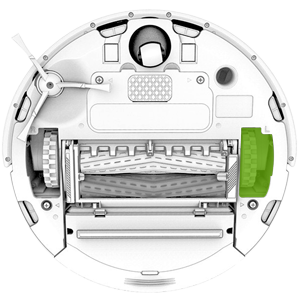
Error 7 means the left side wheel cannot turn. This can happen if Roomba® i Series was started on an uneven surface or got stuck on an obstacle. If this is the case, lift Roomba® off the floor, place it in the center of the room, and restart the clean cycle. Use Dual Mode Virtual Wall® Barriers to block off problem areas. Otherwise, please check the wheels:
Note: Roomba i1/i1+ and i2/i2+ are not compatible with Virtual Wall® Barriers.
-
Check the wheels for obstructions.
-
Push the wheels up and down and shake out any loose debris that may be trapped in the wheel well.
-
Briskly turn both wheels by hand and make sure they turn freely and that each wheel exhibits the same amount of resistance. If a wheel cannot be turned by hand, place Roomba on the floor and manually push Roomba backwards and forwards, about >1 ft ( 0.3 m >).
-
If compressed air is available, gently blow air into the wheel well.
If the message persists, please perform these additional steps:
- Reboot the robot. Issue persists after the reboot?
- Remove the wheel module from the robot, then place it back in and onto the dock. Let the robot boot up, then run it again to see if the error is persisting.
If the error persists after all steps performed, you may need a replacement left wheel module.