Error twenty-six (26) means the vacuum is experiencing insufficient airflow.
It is recommended that you clean or replace the bin filter. Then try to run the robot again.
Click here to see the steps.
-
Press the bin release button on the back of the robot to remove the bin. The bin release tab has a  bin icon on it.

-
Open the bin door to empty the bin. The bin door release button has a bin icon.
-
Grasp the side of the filter to remove the filter from the left side of the bin.

-
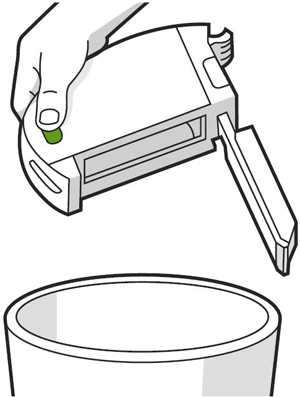
Shake off debris by tapping the filter against your trash container. Then, replace the filter.
Note: Filters are not designed to be washed or to come in contact with liquid.
-
Rinse out excess debris with warm water and allow the bin to dry. Ensure the bin is completely dry.
Note: The bin is designed to be rinsed by hand only. It is not dishwasher safe and should only be cleaned by rinsing with warm water.
-
Place the filter back into the bin.
- Slide the bin into the bin slot, securing it into place.
If the error persists, please reboot the robot by holding down the CLEAN button. Doing so should clear the error from the robot's memory.
| For j Series and 10 Max, hold the CLEAN button for nine (9) seconds. | For the i Series, hold the CLEAN button for twenty (20) seconds. |
|

|

|
If the error persists after replacing the bin filter and rebooting the robot, the cleaning head module may need to be replaced.
Note: You must remove and reinstall the battery when you replace the Cleaning Head Module. Otherwise, the CHM still won't work and there will be no error.
Non-Modular Robots
Newer i1, i3, and i5 robots will be non-modular, meaning the Cleaning Head Module (CHM) cannot be replaced. There are two easy ways to confirm whether you can replace the CHM or not. Pick the easiest one.
- Check the serial number. If the eighth digit is the letter N or Z, the robot is not modular.
-
- Example: i557020NYYMMDDN4##### or i557020ZYYMMDDN4#####. If it's any other letter, the CHM can be replaced.
- Flip the robot over and look for a battery door. If your robot has a battery door, then the bottom cover does not come off, and the CHM cannot be replaced.
 |  |
| Original Bottom Cover | New Bottom Cover with Battery Door. (No modules) |
If you need to purchase a new Cleaning Head Module, please visit the iRobot® Store - Parts and Accessories or use an authorized retailer to order a part.
How do I Replace the Cleaning Head Module?
If you believe you're in warranty, please contact iRobot® Customer Care. For expedited service, please have the following ready:


