Does Not Return Home, All Roomba® Models
Roomba® should return home when its HOME button is pressed or when pressing "Return to Home Base®" in the iRobot® HOME app.
Note: On j series, hold the robot button for 2–5 seconds.
If Roomba® is picked up and moved during a cleaning job, it will have difficulty finding the Home dock®. Please place it within 6 ft. (1.8 m) in front of the Home dock® in order for it to dock correctly.
If your robot still does not dock onto the Home dock®, follow the steps below.
- Unplug the line cord from the Home Dock® and then thoroughly insert it with a tight fit.
- Verify that the power indicator on the Home Dock® is turned on for approximately four (4) seconds and then goes out - this behavior is normal, and designed to conserve energy.
- Ensure there are no other Home Docks® located within >8 ft (2.5 m >) of the Home Dock®. These could cause infrared beam interference.
- Position the Home Dock® on a hard, level surface against a wall. Ensure Roomba® has a clear path to the Home Dock®, and that the Home Dock® is at least >4 ft (1.2 m >) from any stairs, and that Roomba® has a clear way to reach it.

- Ensure there are no foreign objects (e.g., stickers, tape, or paint) on the bumper or the Home Dock®.
- Wipe down the charging contacts on the Home Dock® and Roomba® with a lightly dampened melamine foam, such as a Magic Eraser.
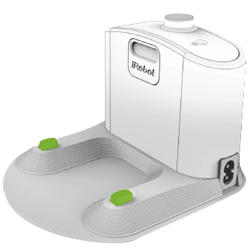
Charging contacts on the Home Dock®.
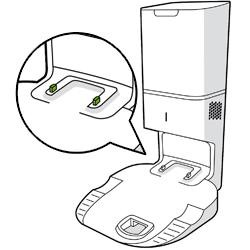
Charging contacts on the Home Dock® Charging Station + Automatic Dirt Disposal.

Charging contacts on Auto-Fill Dock™
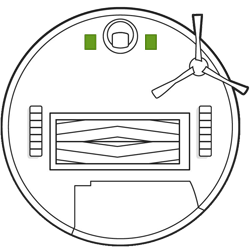
Charging contacts on the robot.
- Press and hold the button for three (3) seconds to clear your previous cleaning job.
- Verify Roomba® can return to its Home Dock® by manually facing Roomba®, within >6 ft (1.8 m >), toward the Home Dock®.
- Turn Roomba® on, and tell it to go home by pressing the button on the robot or in the app.
Important: If your Roomba® Essential is not returning to its Home Dock®, be sure you have removed the thin plastic film over the IR window on the bumper and Home Dock®.
For expedited service, please have the following ready:
- Your robot charged and with you.
- Your robot's Serial number.
- For warranty claims: Proof of purchase (receipt or invoice for purchase from an authorized retailer).