Indicators
Roomba® says “Error one (1). Left. Place Roomba® on a flat surface, then press CLEAN to restart.”
Overview
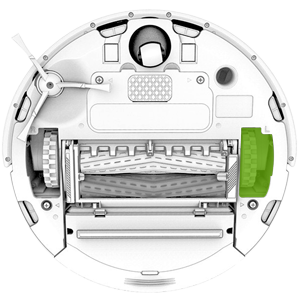
Error 1 (left) means Roomba® is on an obstacle or an uneven surface, and the left wheel is stuck. If this is the case, lift Roomba® off the floor, place it in the center of the room, and restart the clean cycle. If this error occurred on a flat surface, check the wheels for obstructions.
 Use a Virtual Wall® to keep Roomba® away from problem areas.
-
Push the wheels up and down several times and shake out any loose debris that may be trapped in the wheel well.
-
Briskly turn both wheels by hand and make sure they turn freely and that each wheel exhibits the same amount of resistance.
If the error persists after cleaning the left wheel and Roomba® is on a flat surface, you may need a replacement left wheel module. Please visit the iRobot Store - Parts and Accessories or use an authorized retailer to order a part. If you believe you're in warranty, please contact iRobot Customer Care..
For expedited service, please have the following ready:
- Your robot charged and with you.
- Your robot's Serial number.
- For warranty claims: Proof of purchase (receipt or invoice for purchase from an authorized retailer).