Indicators
- The Wi-Fi connected Roomba® 900 series says “Error eight (8). Please open the iRobot App for help.”
- The Wi-Fi connected Roomba® 800 series says “Error eight (8). Please open the iRobot HOME App for help.”
- Roomba® 800 series says “Error eight (8).”
- Select models will play a two-tone “Uh-Oh” sound followed by eight (8) beeps.
Overview
Error eight (8) means the vacuum motor is having problems spinning, or the filter is clogged. Use the following to perform bin and filter care procedures:
- Remove and empty the bin.
 | 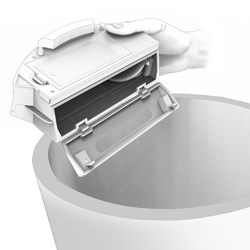 |  |
| i. Press the bin release tab to remove the bin. | ii. Open the bin door to empty the bin. | iii. Check the fan in the bin for any dust or debris that may have collected. Cleaning this with compressed air or a Q-tip can help resolve this issue. |
- Clean the filter.
 |  |  |
| i. Press and lift the filter door release tab. | ii. Remove the filter by grasping the yellow tab. | iii. Shake off debris by tapping the filter against your trash container. |
- Remove the bin and briskly tap the bottom of the bin.
If the message persists, you may need a replacement bin. Please visit the iRobot Store - Parts and Accessories or use an authorized retailer to order a part. If you believe you're in warranty, please contact iRobot Customer Care.
For expedited service, please have the following ready:
- Your robot charged and with you.
- Your robot's Serial number.
- For warranty claims: Proof of purchase (receipt or invoice for purchase from an authorized retailer).



